Hack Western Technical Retrospective
Published Mar 4, 2022 • Last reviewed Mar 6, 2022
Updated since initial publication. See the latest revisions reflected in this version.
A review of things that went well and things that could be improved for Hack Western 8's development team.

Leading the Hack Western development team is a baptism by fire. While the size of the team, complexity of the sites, and the size of the user base is nothing unheard of, the challenge is bringing all of those together and delivering a stable experience with a small team. In the spirit of learning, I want to share some of the things I think we (the Hack Western 8 development team) did well and also some things that didn't work as well as expected. I'll suggest alternatives and potential solutions to address each pain point. As well, I've included some things that just made us laugh.
Things that went well
Monorepo
In previous years, the amount of ctrl+c + ctrl+v on components, endpoints, and entire repositories is shocking. I can see why this happens though. In previous years, supporting multiple domains and subdomains (like live.hackwestern.com for example) meant creating a completely new application, and often, a completely new repository. This simplifies the deployments as each site is an isolated project. This year, we used yarn workspaces and had a monorepo for all of the sites. We shared components, static assets (like the Hack Western logo), and themes between all of the sites.
A fair question might be why we didn't build ONE site and separate functionality with paths. Honestly, this is a fair point and would've simplified a lot of things. The only reason we chose to use a monorepo with multiple apps was so that we could choose different frameworks depending on our needs. We used next.js's static site generation feature to build our more content heavy sites and create-react-app for anything that required authentication like our application portal and dashboard.
TypeScript
Introducing TypeScript and TypeScript React was a huge win for our team. Only two (myself included) of the six team members had experience with TypeScript but it's similar enough to JavaScript so it's easy to pick up. Plus, if you really are struggling, you can always slap a any and call it a day.
Fun fact, the Hack Western 8 repository only uses the any type twice!
Authentication
Authentication was the very first thing our team tackled starting in June (6 months before the event). Having all the usage patterns in place made it easier for the developers to implement any authentication checks client side as there was a well defined approach. Because we had so much time to test and make necessary changes before any real frontend development started, team members working on the UI could be very certain that the way they were interacting with the user (checking authentication, accessing properties, updating fields) would not change. In contrast, during Hack Western 7, we were making changes to the authentication system less than a week before the event which led to a lot of refactors.
Preview Deployments and Testing Environments
All of the sites deployed during Hack Western 8 were hosted on Vercel which was a net positive addition this year. It did have some ugly things about it but I'll speak to those later. The main advantage of Vercel was the preview deployments and integration with our git workflow. Each pull request generated a new preview deployment where developers and designers could test out the site.
Things I could do better
Disclaimer: When I say things like, "there isn't a way to..." or "I couldn't..." or "there's no way to...", what I mean is: "I couldn't figure it out in a reasonable amount of time." Your mileage may vary.
MongoDB with TypeScript is pain
As far as I know, Hack Western has been using MongoDB and mongoose since Hack Western 4 and continued using it for Hack Western 8 because, well... why not? This turned out to be kind of annoying. One thing I really disliked about mongoose's TypeScript support is that everything is defined twice. This is from mongoose's official TypeScript support page:
You as the developer are responsible for ensuring that your document interface lines up with your Mongoose schema. For example, Mongoose won't report an error if email is required in your Mongoose schema but optional in your document interface.
import { Schema, model, connect } from "mongoose";

// 1. Create an interface representing a document in MongoDB.
interface User {
  name: string;
  email: string;
  avatar?: string;
}

// 2. Create a Schema corresponding to the document interface.
const schema = new Schema<User>({
  name: { type: String, required: true },
  email: { type: String, required: true },
  avatar: String,
});
It works, but it's annoying to have to manually synchronize the interface with the schema.
I may be mistaken here, but I think we ended up referencing this post by Hansen Wang. Our user model looked like this:
/* eslint-disable @typescript-eslint/no-this-alias */
import { Model, model, Document, Schema } from "mongoose";
import { User } from "@hw8/akita";
import bcryptjs from "bcryptjs";
import jwt from "jsonwebtoken";
import { ACCESS_TOKEN_SECRET, REFRESH_TOKEN_SECRET } from "../../config";

export interface UserDocument extends User, Document {
  generateAccessToken: () => string;
  generateRefreshToken: () => string;
}

export interface UserModel extends Model<UserDocument> {
  findByEmail(email: string): Promise<UserDocument>;
}

const UserSchema = new Schema<UserDocument, UserModel>(
  {
    email: {
      type: String,
      required: true,
      unique: true,
    },
    // some more stuff here
  },
  {
    timestamps: {
      createdAt: "createdAt",
      updatedAt: "updatedAt",
    },
  }
);

UserSchema.pre<UserDocument>("save", async function (next) {
  // some real code
});

UserSchema.statics.findByEmail = function (email: string) {
  return this.findOne({ email: new RegExp(email, "i") }).exec();
};

UserSchema.methods.generateAccessToken = function (this: UserDocument) {
  // some real code
};

UserSchema.methods.generateRefreshToken = function (this: UserDocument) {
  // some real code
};

export default model<UserDocument, UserModel>("User", UserSchema);
This works, but I don't think it's the best solution. If I could do it again, I would opt to use a TypeScript ORM like MikroORM or Prisma.
Switching to a sql database might also be of consideration for the simplicity. The user schema doesn't need the document structure and schema flexibility that MongoDB provides. Plus, after 8 Hack Westerns, I think we have a pretty good idea of what fields we need way before hand.
Deploying a Monorepo
Developing in a monorepo was a beauty. Shared components, themes, static assets, and even node modules! Deploying it, not so much. While Vercel has support for monorepo deployments, the configuration options for the build are limited.
Below is a simplified hierarchy of the Hack Western 8 monorepo.
\hack-western
    \apps
        \application-portal
            \dist
            \src
        \marketing-site
            \dist
            \src
    \packages
        \ui
            \dist
            \src
There are two apps, the application-portal which is a bootstrapped from create-react-app and a marketing-site which is a next.js app. The ui package contains common themes and components and is used by both applications. In development, we have a script that watches and compiles the ui's src directory. The generated dist directory is consumed by the apps.
When deploying on Vercel though, there is no way to configure a build for a package outside of the project directory before building the project itself (i.e., Vercel can't build the ui package before building the application-portal). This meant that the ui's dist folder had to be tracked to git which is never a great solution. Again, this works, but was much uglier than I had hoped.
What's the solution? I'm not sure actually. I raved about how great preview deployments were and how nice it was to develop in a monorepo. Here's what I'd do if I could do it again:
If subdomains and different applications are a necessity, I would choose to use a monorepo but deploy the apps on some virtual private server where I can gain back control over the build steps. I know I raved about how great preview deployments are but this can be replicated somewhat by creating a separate staging environment.
Otherwise, I'd simplify the repository structure and use a single next.js application for everything.
Application Deadline (and retiring sites)
While building the application portal, I glossed over the fact that the application portal should stop accepting applications after the deadline. In hindsight, this is very obvious. In order to stop accepting applications, we took down the site from Vercel. This isn't the most elegant solution because:
- clients that cached the site could still submit their application;
- missing the deadline !== page does not exist, but users were shown the same messaging;
- users that submitted applications on time had the ability to review their application, but if they tried to review their application after the deadline they would be greeted with a 404 error.
What I should've done is added a time check. If the current time was after the deadline, then the client should render some message. The endpoint should check the current time and reject (or maybe accept and flag) any late applications.
Poor Schema Design
I knew early on that there would be multiple types of users (organizer accounts, hacker accounts, zero-to-hero accounts, sponsor accounts, etc) but I used the same user schema from last year where we only had one type of user. To be honest, I can't recall why I did this. I think this happened because I just copied over the schema from last year so that I could build out the authentication functionalities but neglected to revisit the schemas afterwards.
This became really annoying as we had to keep adding flags and properties to the user schema to differentiate between all the different users.
A much better approach would be to isolate all the account properties into one interface, account, and have all the different types of users inherit this interface.
interface Account {
  email: string;
  password: string;
}

interface Hacker extends Account {
  // more fields
}

interface Organizer extends Account {
  // more fields
}
Things we laughed at
Forgot to uncomment CRITICAL code
This actually happened and was in production for a few days (September 29th - October 2nd)...
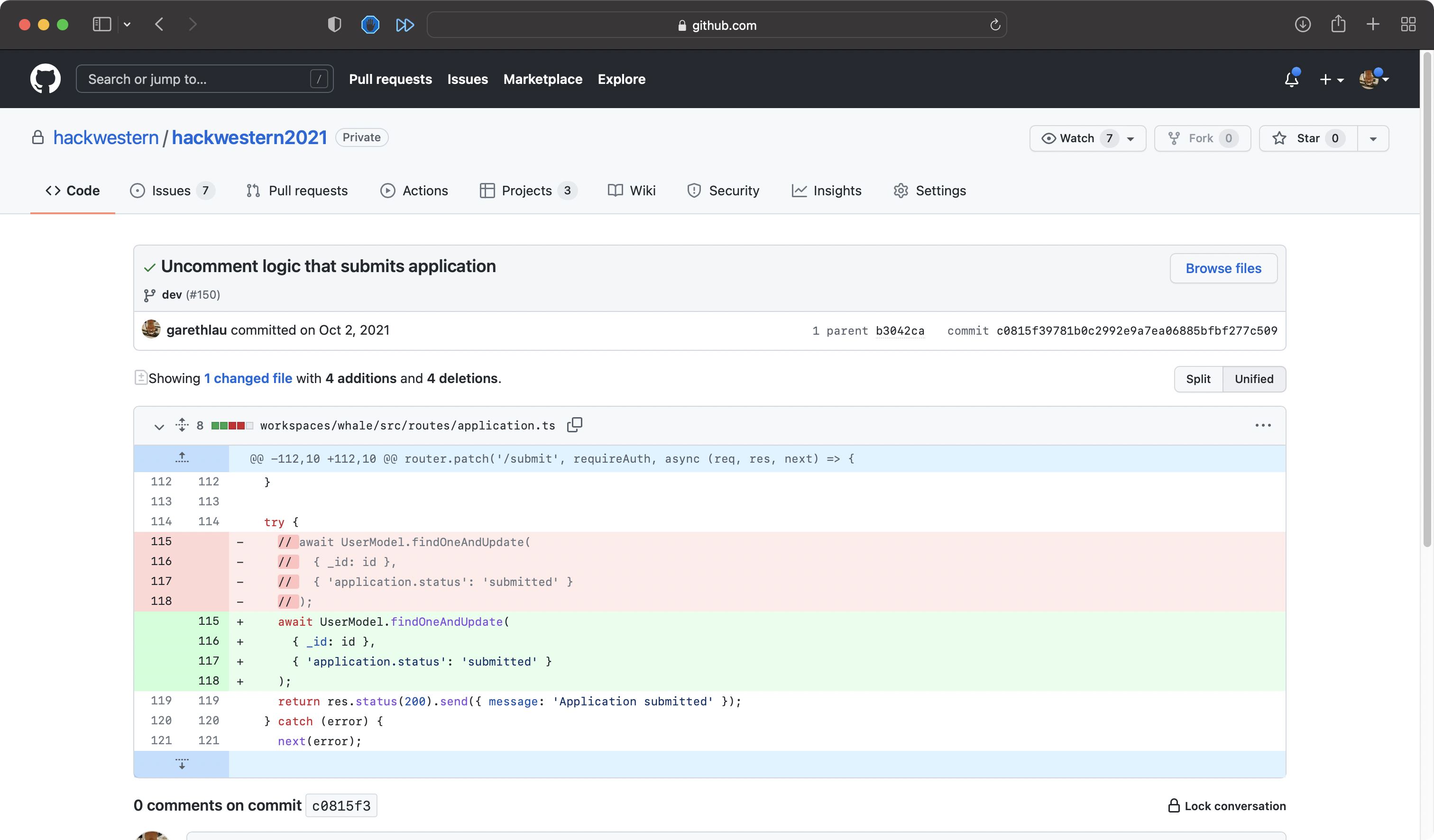

Luckily, we had logs of all of the requests received by our server so we could see which users made requests to our submission endpoint during that period and submitted the applications on their behalf.
Vercel Sites Blocked on Campus
During the week of October 20, 2021, we were getting multiple reports informing us that the Hack Western sites were not accessible. Turns out, Vercel was added to an IP blocklist that Western University is subscribed to.
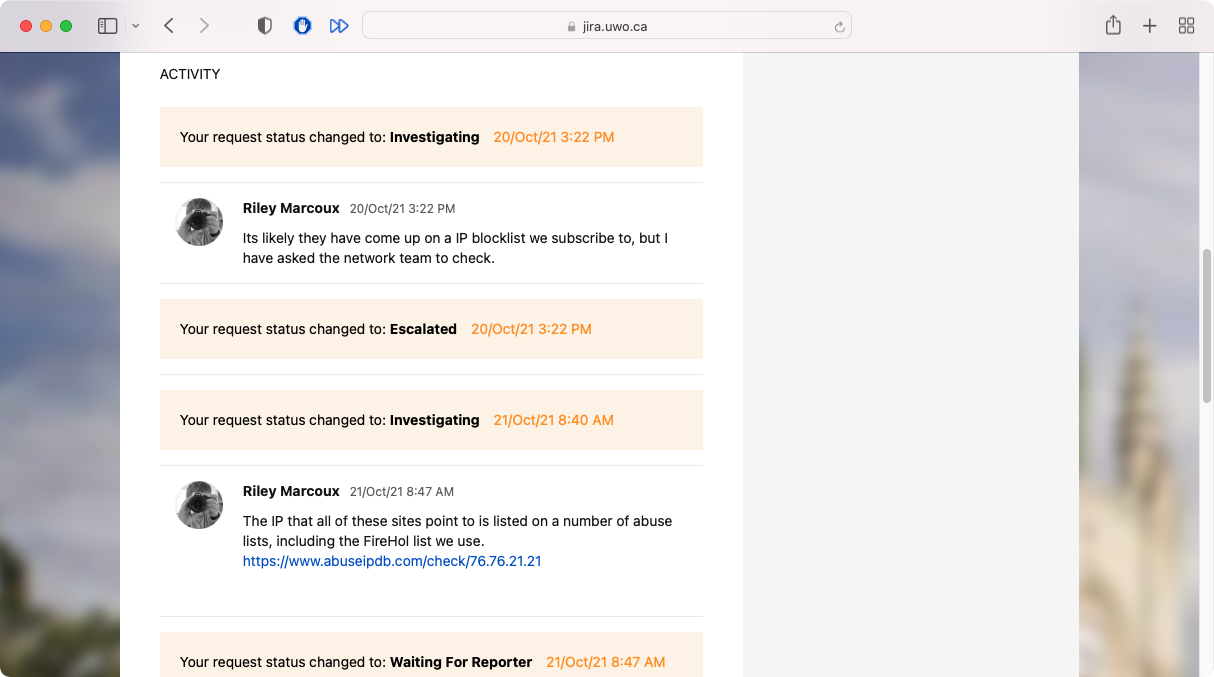
Our development team didn't notice this at all because a lot of development was happening off the campus network. We were prepared to move all the deployments to Digital Ocean if it wasn't resolved in a few days.
Wrong Password Reset Link
When we moved the application portal/dashboard from https://apply.hackwestern.com to https://live.hackwestern.com, I forgot to update the APP_SITE_URL environment variable. This was sending users a link to a site that was no longer live.
Neglected Loading State
We had this loader in production all the way until November 12, 2021:
if (isLoading) {
  <div>loading</div>;
}
Nothing wrong with this, but I suspect it would've lead to a very jumpy UI for some users.
Dark Mode
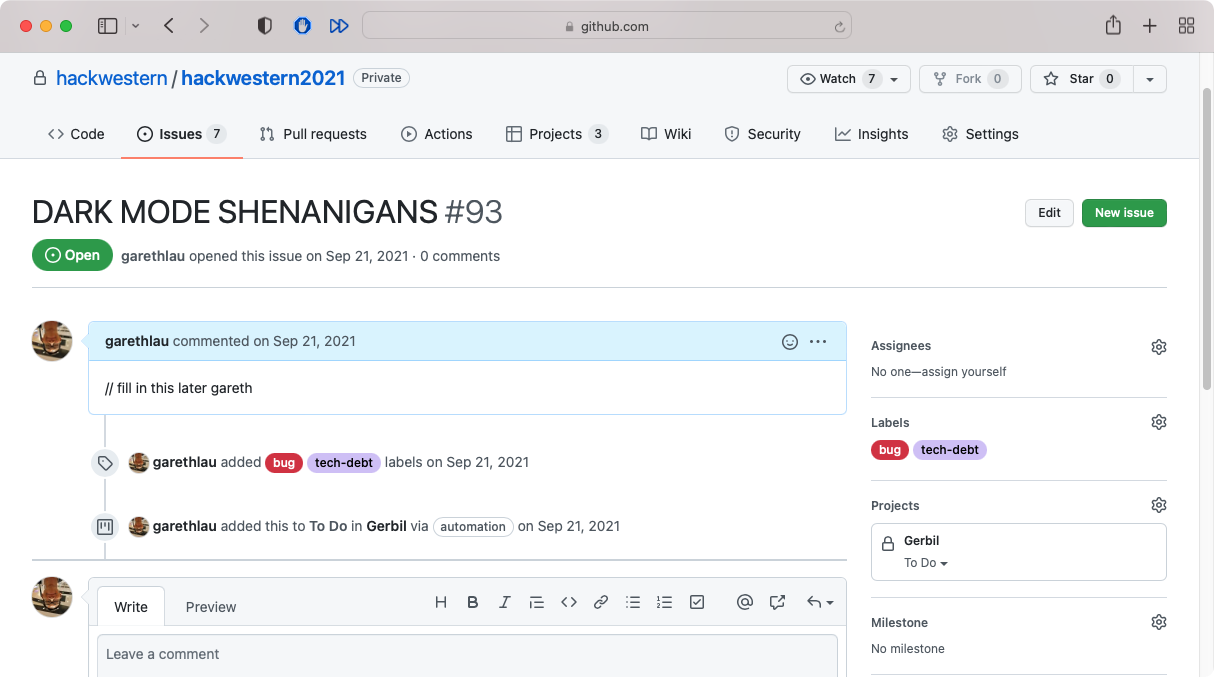
We noticed that the Windows 11 system light/dark mode was overriding the browser's configurations. We forced the site to be in light mode using the theme config but found that, even though we disabled useSystemColorMode, Windows was still having its way. At this time, Windows 11 hadn't officially been released yet so we made this ticket and called it a day:
Connect
Last reviewed on February 20, 2026