How I Use Obsidian
Published May 20, 2023 • Last reviewed Sept 22, 2023
Updated since initial publication. See the latest revisions reflected in this version.
My Obsidian note taking system that has helped me document and review more with less friction.
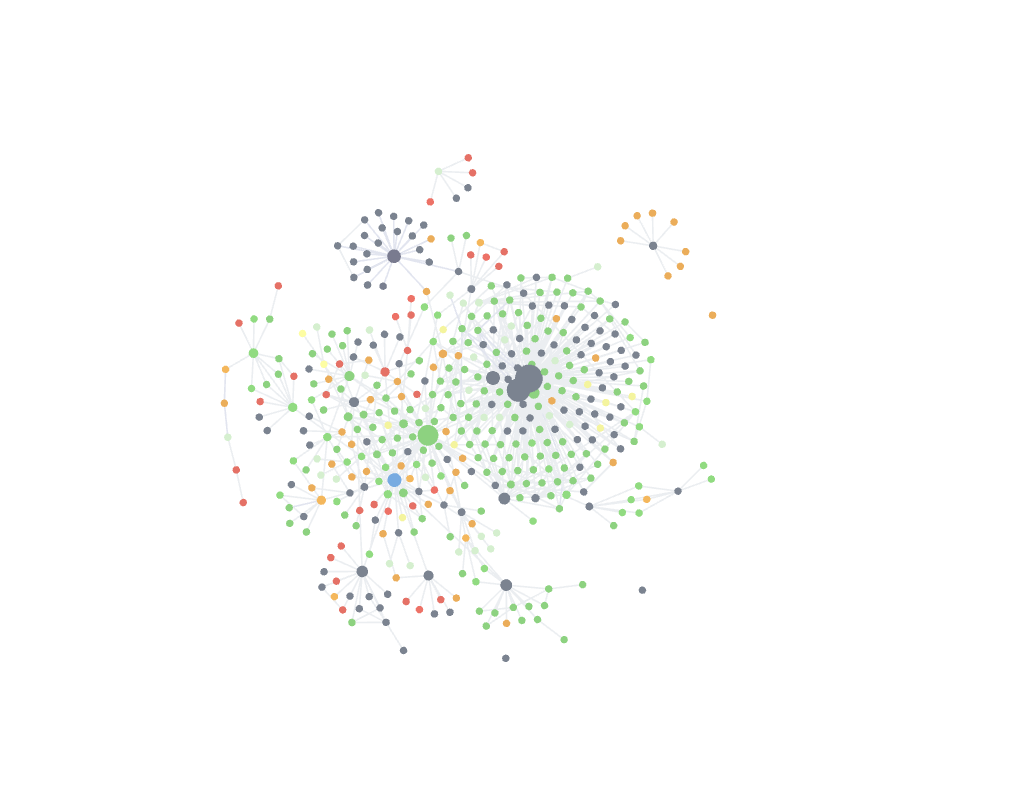
It's been 1 year since I switched from using Notion to Obsidian. Since then, I've developed a system that has helped me document and review more, both with less friction. In this post, I'll share my Obsidian note taking system.
Note Types
Obsidian is not my everything app. I don't use Obsidian as my calendar, to-do list, or as a file database. I don't use Obsidian to store everyday notes either like shopping lists, itineraries, links to read and watch later, or random thoughts. These all go into Apple Notes. Obsidian plays a specific role in my productivity system to store long-form, knowledge-based notes that (I think) I will revisit in the future. These notes can be categorized into three types: runbooks, knowledge summaries, and explorations. I'll explain the purpose of each note and also provide some examples.
I also want to point out that these categories are purely emergent and don't have any impact on my day to day use. I don't use specific templates or restrict the content I put into notes based on the type. Some of my notes are actually a hybrid between the three categories. I've only categorized my notes in this way to better illustrate how I use Obsidian in my day to day.
Knowledge Summaries
As the name suggests, knowledge summaries are notes that consolidate information about a topic. The main purpose these notes is to simplify resurfacing information about a concept for future projects. These notes build up a foundation of knowledge that I can draw from when learning about new topics.
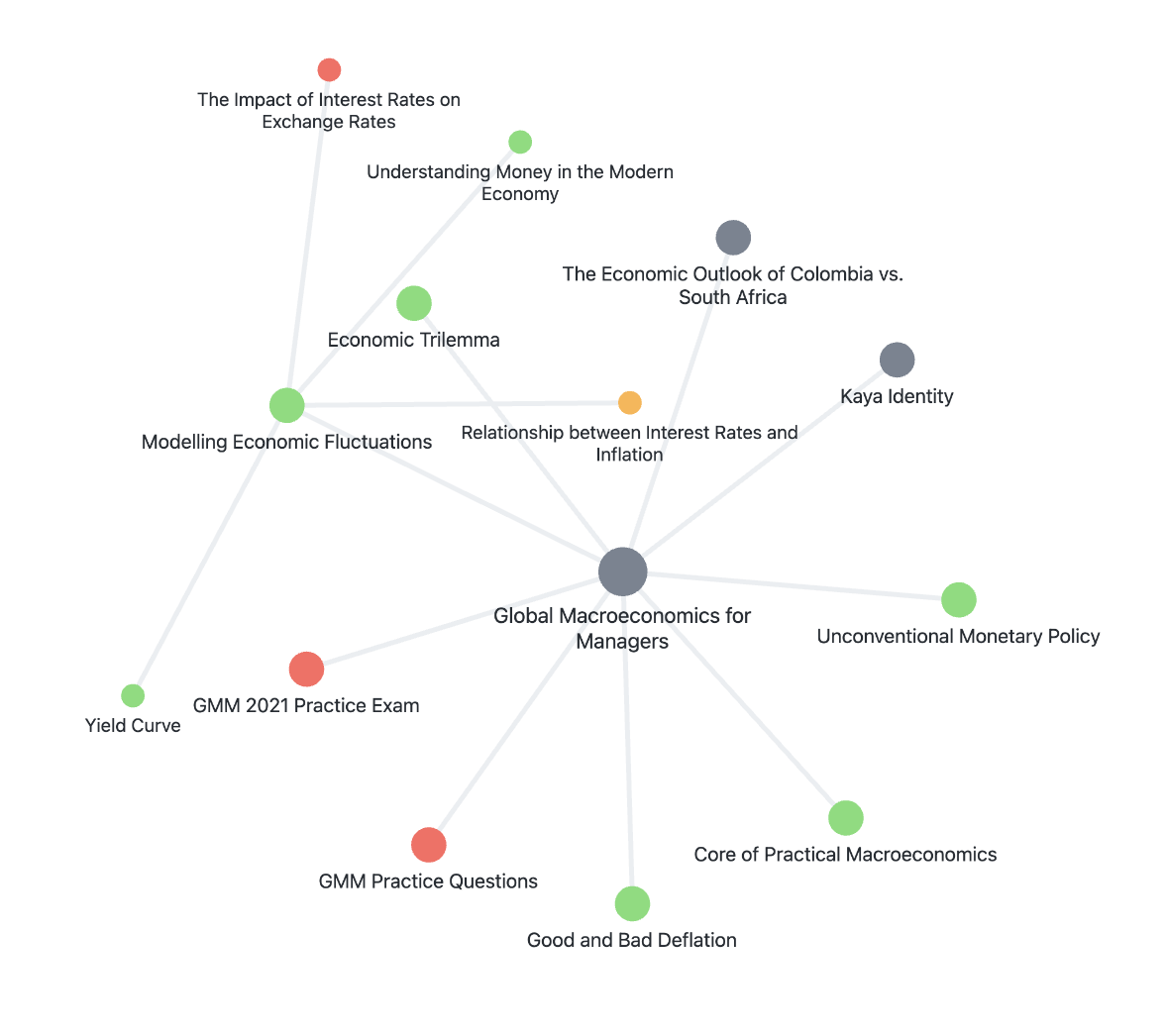
Nearly all of the notes that I create during my academic semesters are of this form. I start by creating a single note for each course. By default, all of the course content goes into the single note but I always give myself the flexibility to create specific notes related to the course when the monolith becomes too unwieldy. The main advantage of keeping everything in a single note is removing extra friction when reviewing: I can be confident I haven't missed any content by making sure I've scrolled through the entire note. I don't have any set rules (like reaching a certain length) for when to create a new note instead of adding to the monolith. Thankfully, it's trivial to separate and merge content so I rarely spend anytime actually thinking about it. To illustrate this, here are some of the notes I took for a macroeconomics course with a retrospective explanation for why I moved the content into separate notes.
- Modelling Economic Fluctuations, GMM 2021 Practice Exam, GMM Practice Questions: I separated these notes because they were applications of theory.
- Kaya Identity: This concept was briefly touched upon so it didn't seem too relevant to the main content but I wanted to learn more about it.
- Unconventional Monetary Policy, Good and Bad Deflation: No clue really.
- Economic Trilemma, The Impact of Interest Rates on Exchange Rates: These concepts seem like they could be related to other note in my vault.
Runbooks
Runbooks are instruction manuals I write for myself. These types of notes are highly specific to the domain. They include step-by-step instructions to get from a start state to an end state. The main goal of these notes is to be repeatable, consistent, and fast.
For example, my note for floatingfile (a personal project of mine) includes instructions to deploy the application on a new virtual machine (VM), to redeploy floatingfile on its current VM, and to release a new version of the floatingfile command line interface.
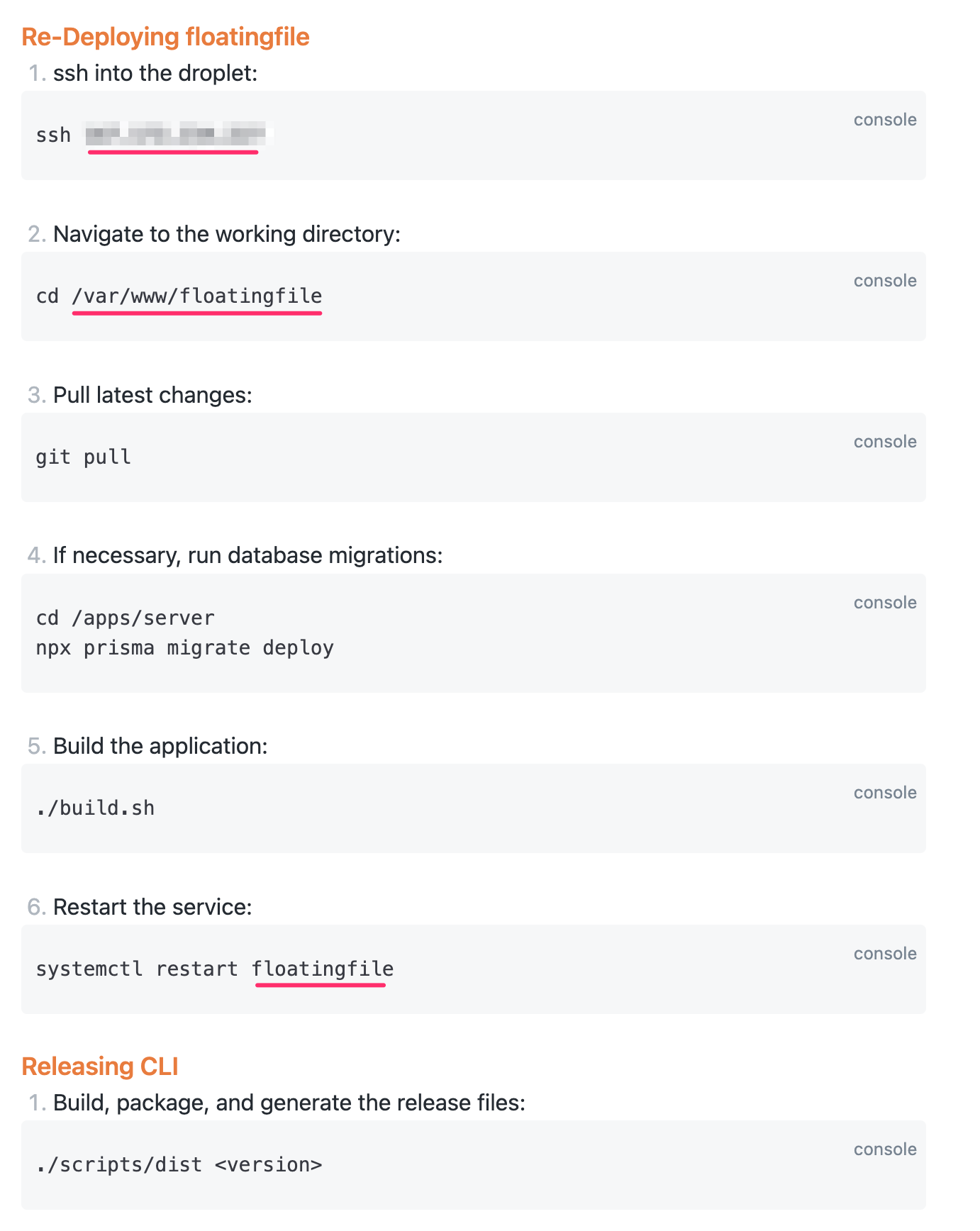
Notice how specific the commands are to floatingfile. I don't try to generalize the commands to work for any IP address or any working directory or any application name. These commands work for the current IP address, the currently configured working directory, and the currently configured application name. This gives me confidence that I can redeploy floatingfile in the exact same way each time without having to do guess work about parameter values.
Another example is a note that details the step-by-step application process for my exchange semester in South Korea. Why did I choose to write this down? Firstly, having a record of each step gave me confidence that I had completed a task like paying for housing, applying for a visa, getting medical checks, etc. Secondly, while I don't plan to reference this note in the future to apply for exchange again, it has been helpful to use as a reference to help other students who might be interested. This note turned out to be more useful than I had thought and actually used it to create a separate post about course planning for exchange which you can find here: [[Course Planning for Exchange]]. TODO:
Explorations
The last type of note is used to track thoughts and steps taken as I work through a task. In this way, explorations are somewhat similar to runbooks but are less consistent and repeatable. The key distinction between explorations and knowledge summaries is that each note is focussed around a problem or task instead of a concept or topic. Again, I'd like to emphasize that this categorization isn't something I think about when creating a note and that these notes are not fixed. Sometimes, an exploratory note turns into a knowledge note or into a runbook.
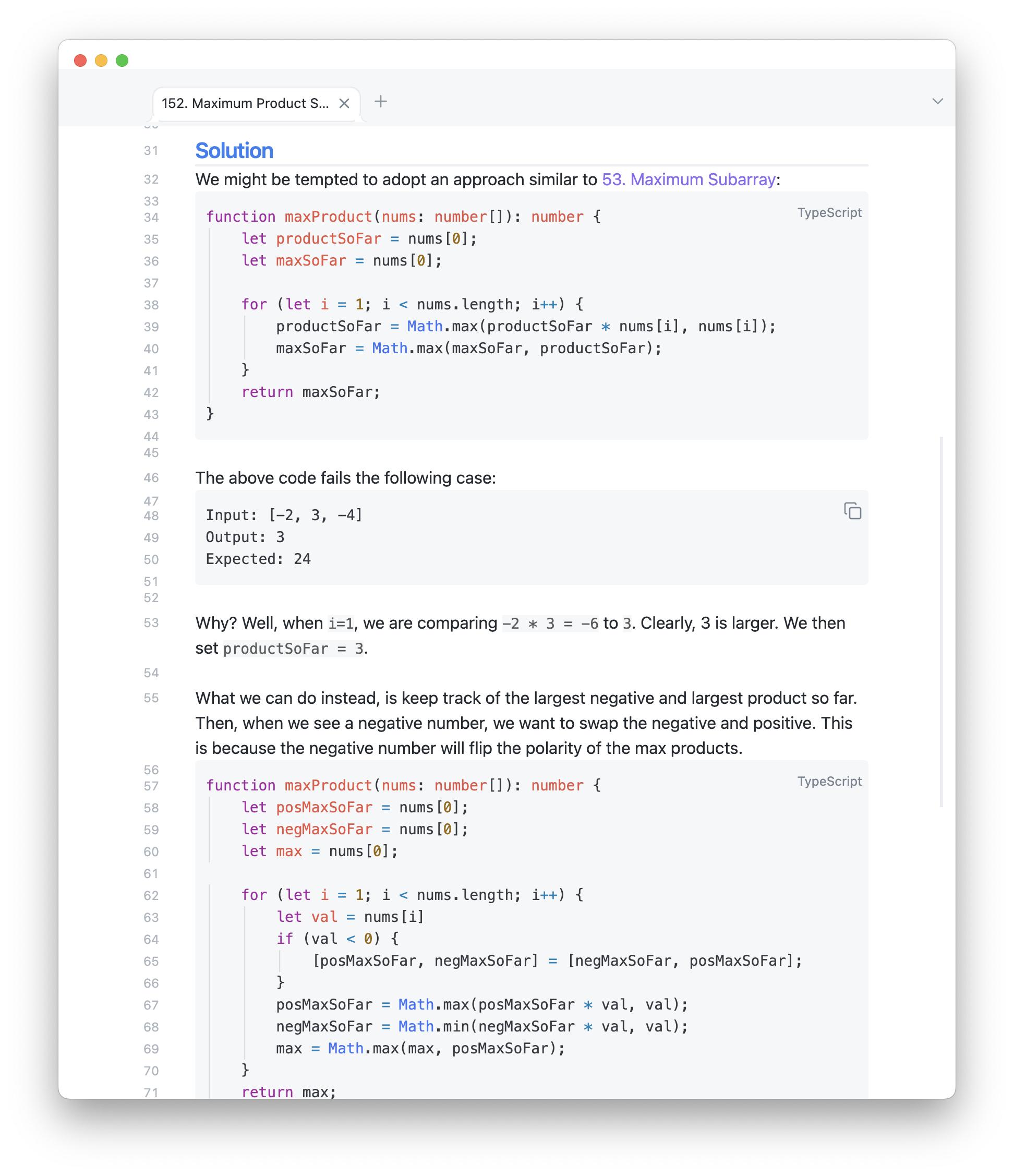
When I am preparing for technical interviews, I create a note for each LeetCode problem I work on. Not only am I able to reference the note in the future, but the process of writing down what I am thinking helps make me understand myself better. For example, I created this note while working on LeetCode problem 152. Maximum Product Subarray:
I also create a new note for each bug I am working on to keep a record of the different things I've tried. These notes are super helpful when explaining the issue and solution. As well, should I encounter the error again, I can quickly find a previous working solution to use a jumping off point.
For example, we first deployed Gavel for Hack Western 7 in November of 2020. During the deployment process, we ran into an error with some invalid environment variables because of the mail agent we were using. After some digging, we found the configuration file that had to be changed and fixed it. Two years later while deploying Gavel for Hack Western 9, we ran into the same issue. Thankfully, I was able to browse through my previous Hack Western related notes and find the solution in just a few minutes instead of spending an hour or more debugging.
Tagging and Categorizing
Obsidian supports folders like in any file system but I do not use folders for any organization because it lacks flexibility. The traditional folder structure constraints notes to a one-directional hierarchy which doesn't fit my needs. As a contrived example, suppose one of my classes uses Python and I have the following structure.
Programming
	\Python
Courses
	\Data Analytics
		\Assignments
If the assignment involved me learning something new about Python, would I put it in the Programming\Python folder or Courses\Data Analytics\Assignments folder? In my opinion, there are good reasons for either. Placing it in the Programming\Python folder would simplify finding it when I need it while working on other Python projects while placing it the Courses\Data Analytics\Assignments folder would make it easy to find should I need to study it for the final exam. Really, this note should be connected to both areas of interest and that is what links allow me to do.
Out of the box, Obsidian provides two very powerful mechanisms to organize notes: tags and links. Obsidian is pretty unopinionated when it comes to tagging and categorizing your notes so there are a variety of ways to effectively do so. The system which I use is inspired by Bryan Jenks' system which you can learn more about by watching his YouTube video. Using tags and links make searching for notes very easy and I'll demonstrate a few example later.
We'll first look at links to see how it organizes notes in a flat structure.
Linking Notes
I use links to connect related topics together. For knowledge summaries, it's usually clear which other notes are related. For example, while reading about Dijkstra's algorithm, I learned that Dijkstra's algorithm can be viewed as a special case of the A* algorithm. In my note on Dijkstra's then, I might write something like this:
Dijkstra's algorithm is an example of a uniform-cost search algorithm and can be viewed as a special case of [[A*]].I don't put any pressure on myself to link notes. There are plenty of notes in my vault that are orphans (do not have any incoming or outgoing connections). This could be because it is the start of a new area of exploration for me or simply because I haven't given the time to connecting the note. At the moment, some orphan notes in my vault cover topics like the Vietnam war (a case of a new area of exploration) and designing chess engines (a case of just haven't given any time to connecting it to any existing notes).
For runbooks, there usually already exists a note that the runbook is related to so I'll add a link from the project to the runbook or vice versa. In my system, the directionality isn't important at all. For example, here is a snippet from my floatingfile note which links my general floatingfile note to its deployment runbook:
For deployment instructions, see: [[floatingfile Deployment Runbook]].For exploratory notes where I do not know which concepts might be relevant ahead of time, I create a section at the bottom of the note to link it to any notes that end up being relevant to the problem or task. For example, it might look like this for a LeetCode problem:
---

Tags:

[[LeetCode]] - [[Breadth First Search]] - [[Depth First Search]]
Using links in this way is extremely flexible and can be done on the fly. I never think about how I should categorize the note I'm about to create which reduces the friction when creating a note. Back to the previous example of a Python assignment in a course, I can connect it to both areas which means I can resurface the information easily from both areas.
Tagging Notes
The other Obsidian feature I used is tags. I use tags to store information about the status of the note. Tags have no indication about the topics or contents of the note. My current system uses four tags:
#status/🌱: Seeded. These are notes that I wan't to populate in the future. Most of the time these notes are created while adding to another knowledge summary. For example, while learning about REST APIs, I came across gRPC. It seemed related so I created a new note for it with the seed status but didn't actually spend time learning about gRPC until later.#status/🧱: Won't fix/archive/dead. These are notes that I no longer maintain or update. The most common use for this tag is to identify out-of-date documentation. For example, a runbook for deploying my app to AWS wouldn't be too useful after the app is migrated to GCP, but I'd still like to keep it around just for reference.#status/🛠️: Needs fixing or under construction. These notes are notes that I am currently working on or need to be fixed in some way. This might be a runbook that I am in the process of updating or an implementation of an algorithm that I never got around to but probably should.#status/🌲: Evergreen. These notes are healthy, maintained, and up-to-date notes. This isn't say that the note contains every single fact about the topic or is final by any means, but just that it contains enough information about the topic and is presented in a way that at the very least isn't more confusing than a Google search.
Moving notes from one status to another is rather arbitrary. There is no checklist of requirements in order for a note to be given a certain status.
Extracting Value
Having a system to create and connect notes is nice and all but what is the purpose of all this? What are the real advantages? I think there are three benefits that come with using this system over a more traditional note taking application.
- Save time looking for files
- Reduce (or remove) duplicate information
- Remember "visit later" topics
File Querying
Using this system allows me to find the notes that I need very quickly. I don't need to remember any folder hierarchy or remember which day or class the note was taken on. To illustrate this, I'll go through some examples of searches that I do.
Searching by the file name is the fastest way by far. Usually, this works really well for my most recent notes and frequently accessed notes. Examples include:
- Projects I work on consistently like floatingfile
- Courses that I am actively enrolled in
- Broad subject areas like TypeScript or data analytics
For example, If I need to pull up my notes on floatingfile, I can bring up the global search with cmd + p and type "floatingfile":
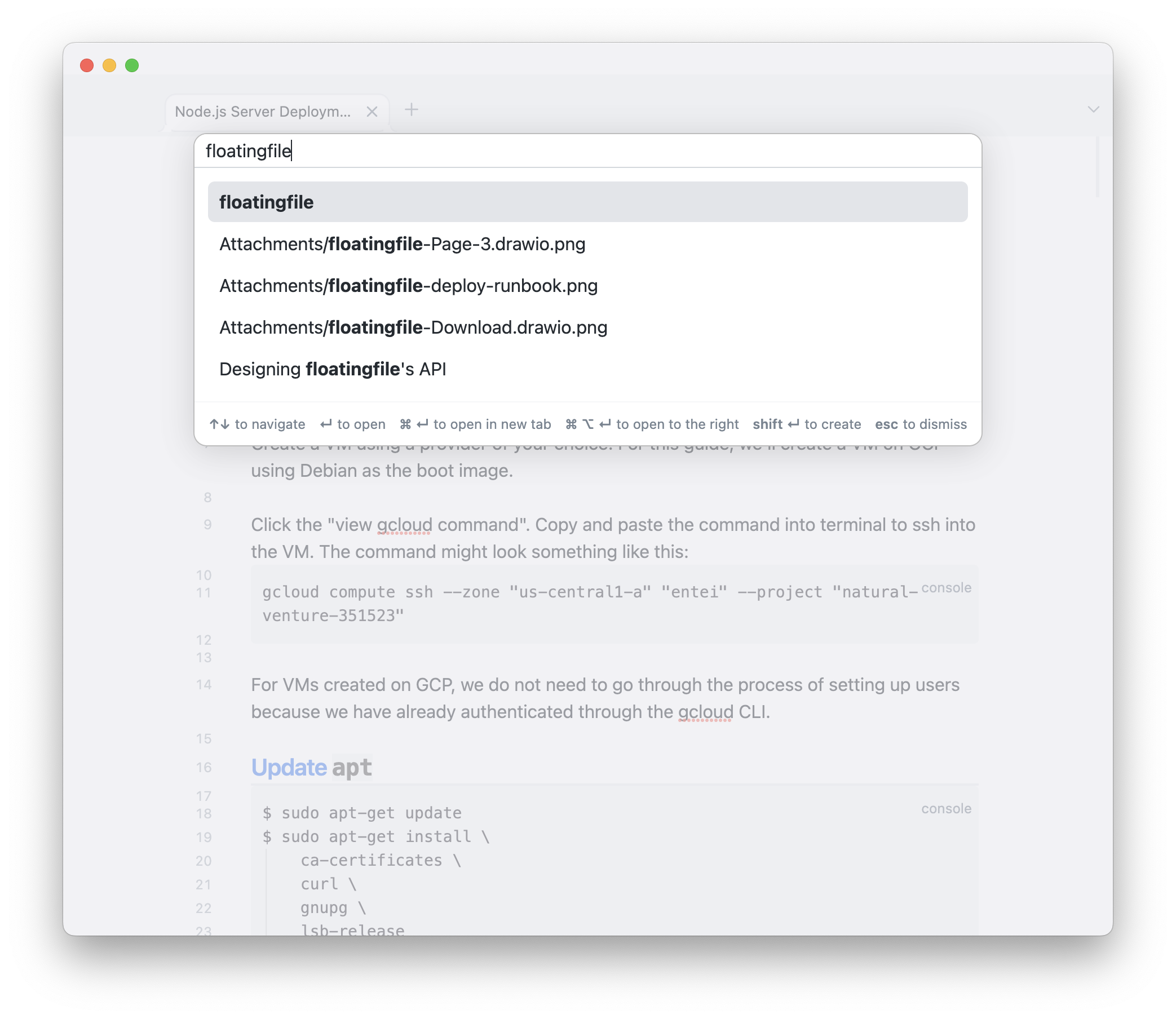
I use this direct search the most often. If I had to guess, I'd say it makes up 95% of all my searches.
I sometimes resort to manually traversing the graph to find a note. I can almost always remember the name of a file that is one jump away from the note I'm looking for. For example, suppose I was looking for a note about a routing algorithm that I just can't remember the name of, I would open the local graph for my note on Dijkstra's algorithm and see what notes are connected.
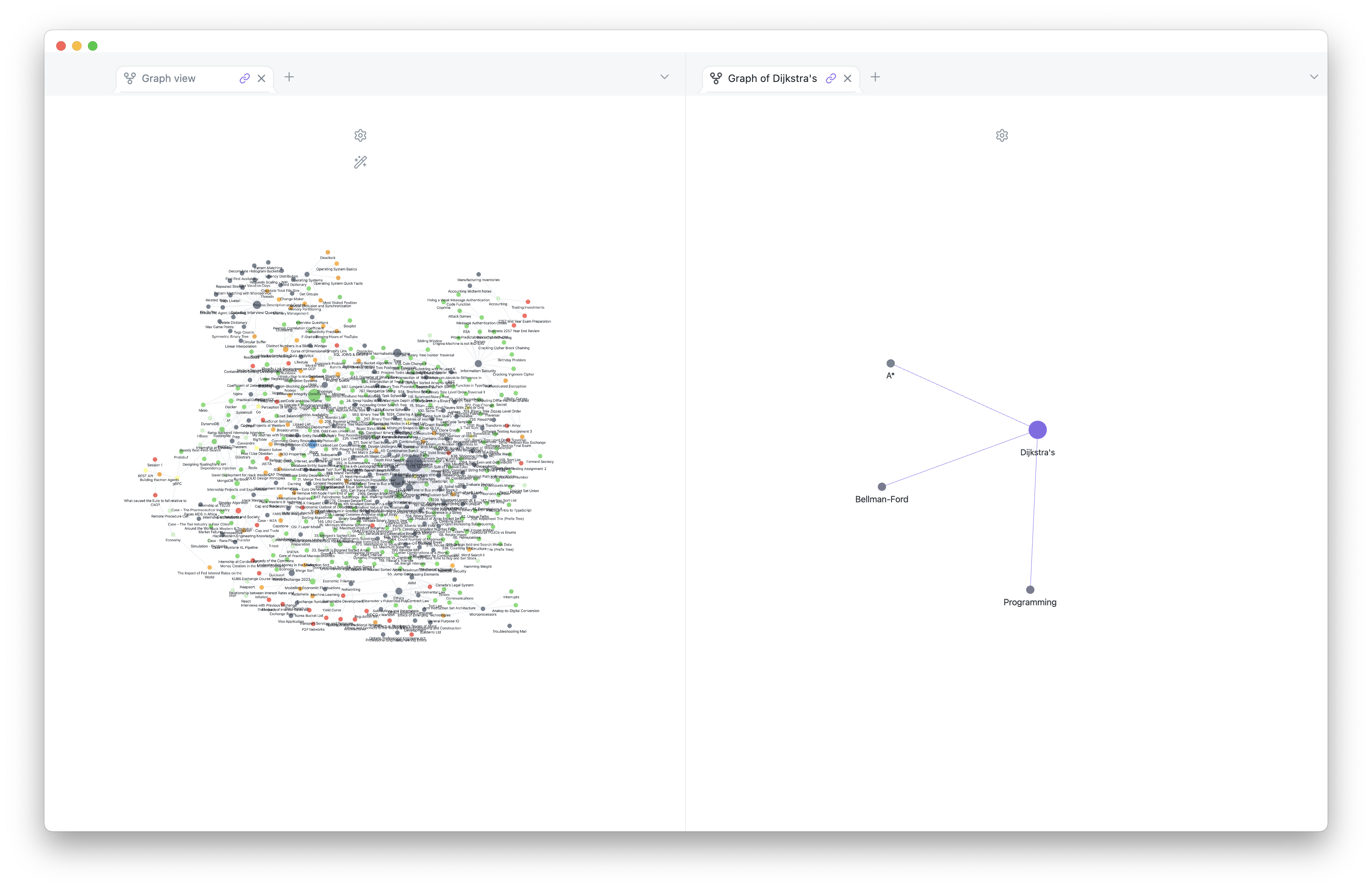
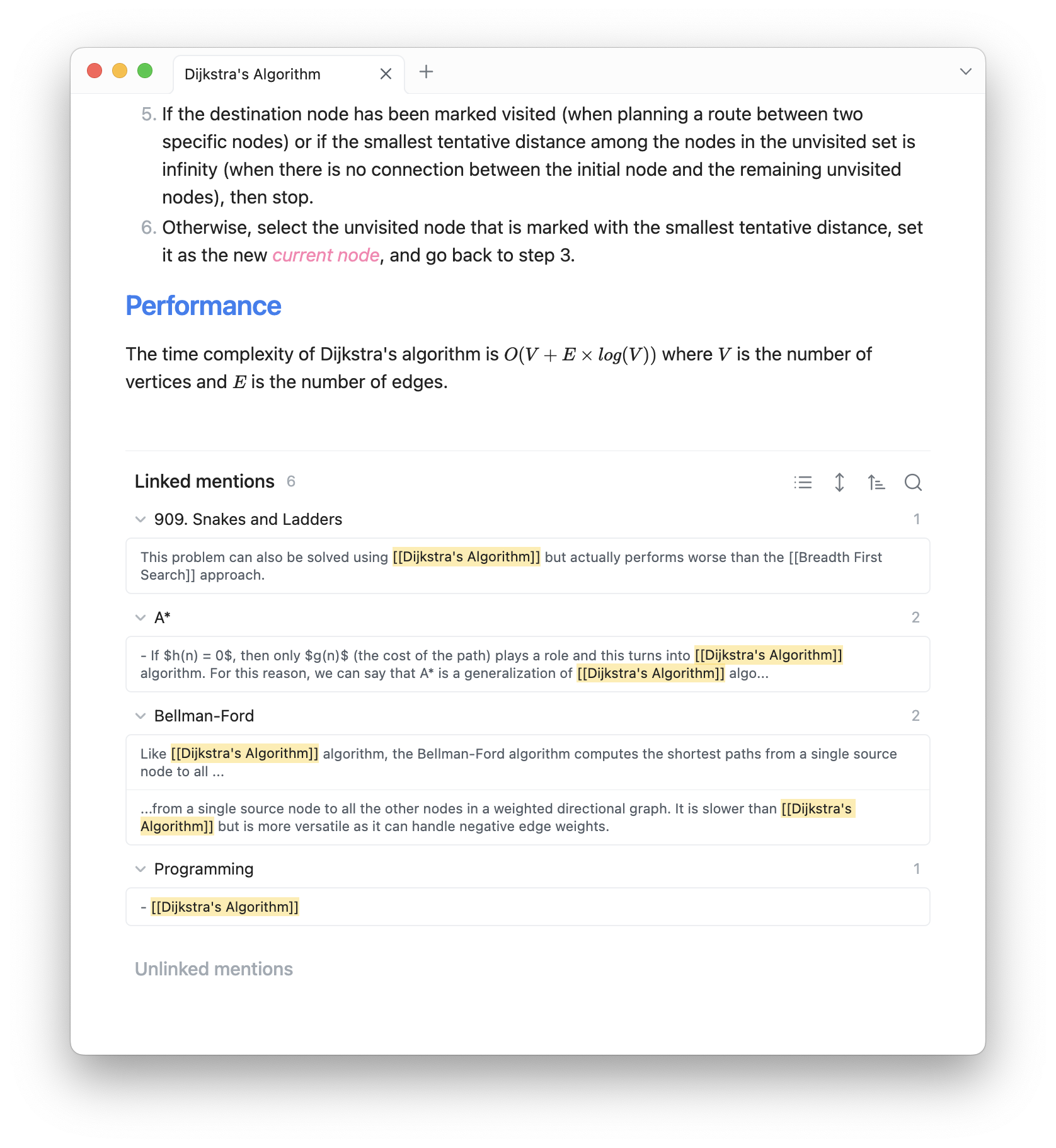
I actually don't use the local graph visualization. Instead, I'll scroll to the bottom of the note to see a list of all linked notes both outgoing and incoming.
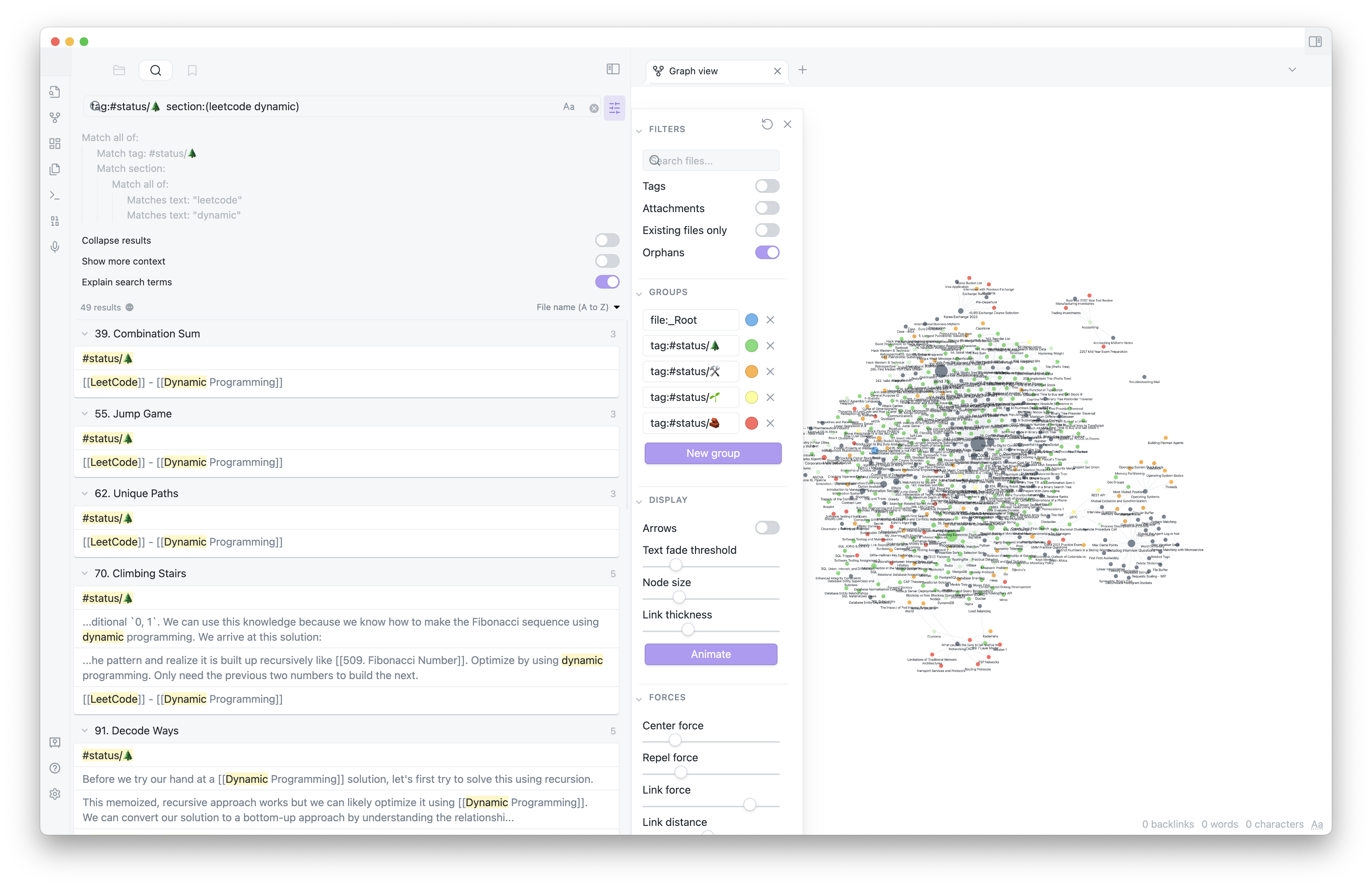
I use Obsidian's search tool if I need to filter out certain notes. For example, suppose I was working on a dynamic programming problem and wanted to reference some of the previous problems I had solved. I could get a list of notes to look through with the query: tag:#status/🌲 section(leetcode dynamic). This returns a list of all notes with #status/🌲 tag and a section that includes both the words "leetcode" and "dynamic".
Duplicate Content
Using this system makes it easy to isolate content and link it to notes instead of duplicating the content between two notes. For example, I recently took two classes on data analytics and management information systems. Both courses use R and covered similar material in both. Instead of having a section on R in both course notes, I created a separate note for R and have links to it from both course notes.
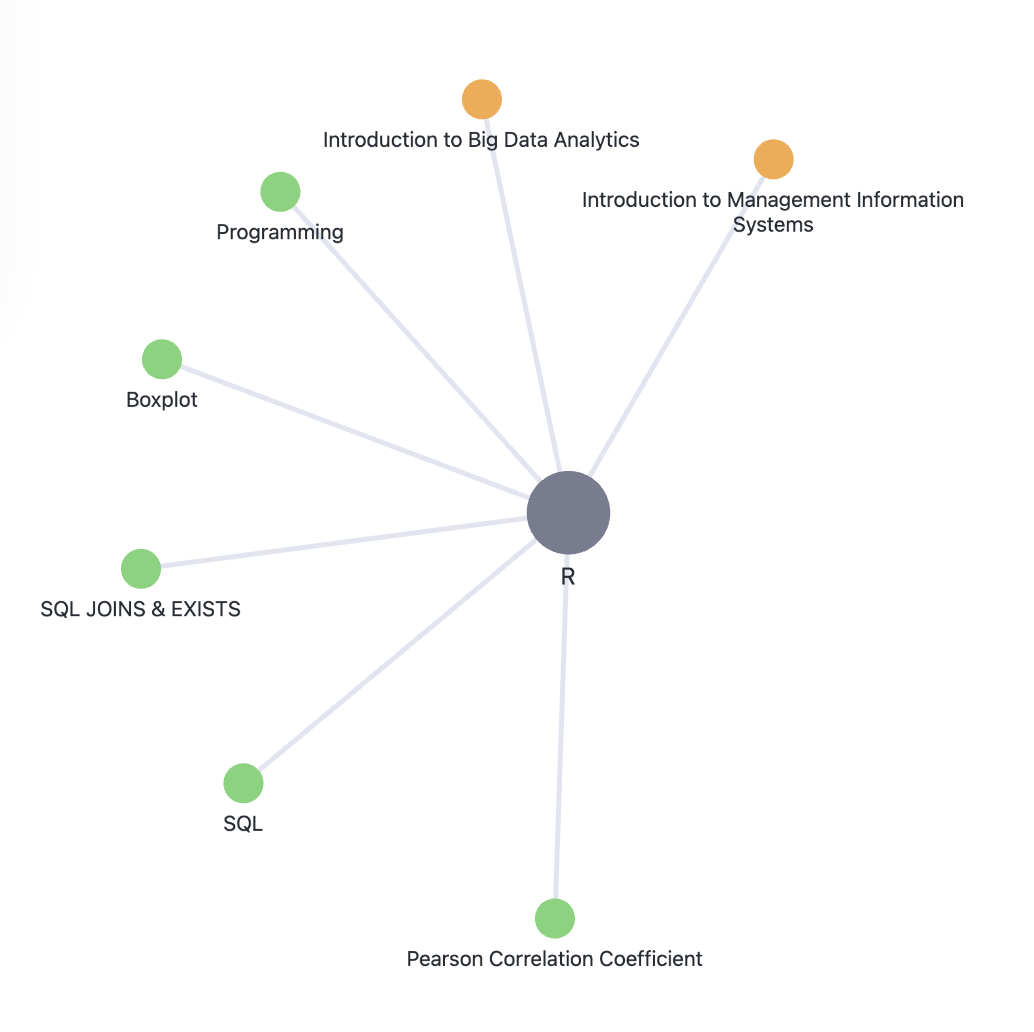
Beware of the consequences when consolidating information like this. It can be very difficult to identify which course covers what content later. This might become a point of fustration. If for example I wanted to only study the content relating to the analytics exam. If this is a concern of yours, you can keep the content isolated and merge the content after the fact like when you have completed both courses. I usually don't do this though. My thinking is that, I'll need to know the material anyways so it'll probably be easier for my own learning if I learn it all together.
Bookmark Topics
After using this system for nearly a year, I've found that it has also helped me learn more. Before using this system, if was researching a topic and came across something that was related and kind of interesting, I pretty much had two choices: look into it now or move on and end up forgetting about it. I tried keeping a list of such topics but the lack of context makes the research process difficult to get back into. Often, I'd forget where I stumbled across the topic or why I thought it was interesting.
With this system, whenever I encounter something that I think might be worth investigating, I'll create a link to it even if I don't create the note. Sort of like planting a seed of knowledge. As I continue to do this, overtime, there might be other notes that link to the seed which will visually show up in my global graph. A seed with lots of links is probably something I should look into! Even if no other notes link to the seed, it still serves as a good bookmarking system for topics I'd like to learn more about. Another benefit of this system is that the link to the seed will be surrounded by content which provides me with helpful context like what was I reading before I stumbled across this topic.
Connect
Last reviewed on February 20, 2026