Automatic Deployments from Github on a VPS
Published Jan 11, 2021 • Last reviewed Jan 11, 2021
Create an automated deployment pipeline off Github for any VPS using Github webhooks.
Automating my deployments has helped me reduce bugs, manage multiple environments, and shorten the development cycle. For me, the initial time investment to setup an automated deployment flow is definitely worth it if I see myself having to deploy to an environment (development, staging, production) more than once a week.
In this post, I'll cover how to automate deployments from Github on a virtual private server. Specifically, I'll be using
- a virtual private server provided by Digital Ocean;
- a fullstack MERN application;
- pm2 to manage the application;
- Nginx as a reverse proxy;
Here's an outline of events:
- Changes are pushed to the specified deployment branch.
- Github recognizes the changes and checks to see if this matches any listed events.
- Matched events will cause Github to send a HTTP POST request to our server.
- Our server receives the POST request and executes any specified actions.
- Our server pull the latest changes from Github, install dependencies, builds, and redeploys.
Github webhooks can be used for a myriad of applications, automated deployments are just one of them. From the Github webhook docs:
Webhooks provide a way for notifications to be delivered to an external web server whenever certain actions occur on a repository or organization.
Here are the three steps in setting up automated deployments from Github:
- Configure Github to send a HTTP POST request when changes are pushed to master
- Create a bash script that will redeploy our application
- Create a listener on our server that will respond to the POST request from Github
Step 1
Let's first configure Github to send a POST request to our server when new changes are pushed. To do this, go to your repository's settings page, find the webhooks tab, and click "Add webhook".
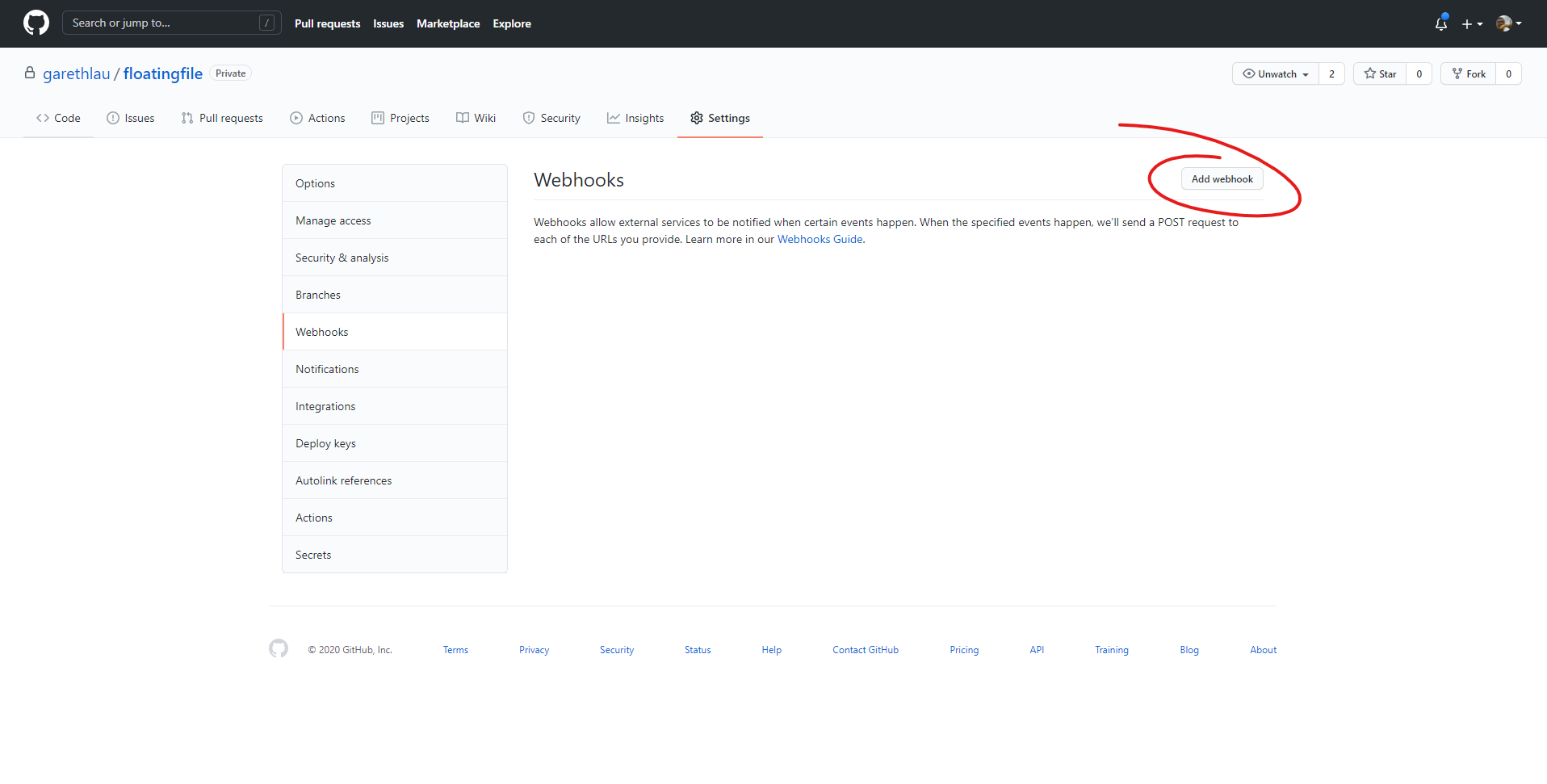
First, set the Payload URL to http://deploy.example.com/redeploy-app. Second, click the "Content Type" dropdown and choose "application/json". Finally, enter a random string as the secret.
Step 2
On our server, lets create a bash script that will be executed whenever changes are pushed to the repository.
touch redeploy.sh#! /bin/bash
echo "Deploying Example App"
echo "Commit ID: " $1
# Fetch the latest code from remote
git pull master
# Install client dependencies
cd client
yarn install
# Build the client application
yarn build
# Install server dep
cd ..
cd server
yarn install
# Restart the application
pm2 restart EXAMPLE_APPYou can either add your Github credentials in-line or use a credential manager. This Stack Overflow post has talks about saving git credentials for a script.
Your script may look very different from mine for a plethora of reasons. Here are some examples:
- You aren't using
npmoryarn - You don't have a client and server directory
- You have different script names defined in
package.json - You don't want to redeploy off of the
masterbranch - You aren't using pm2 to manage your application
- You want to integrate with other services (Slack, Jira, etc.)
Once your done with your script, make it executable:
$ chmod +x redeploy.shStep 3
Creating a Deployment Subdomain
In the Github webhook configuration, we specified the payload URL to be deploy.example.com. Create the deploy subdomain for whatever your domain is. To do this in Digit al Ocean, head over to the Networking panel and add a new A record.
Enter "deploy" in the "HOSTNAME" field and the IP address of your droplet into the "WILL DIRECT TO" field.
Webhook Server
To create listen to incoming webhooks, we'll be using a tool called webhook. The description of webhook is exactly what we need:
webhook is a lightweight configurable tool written in Go, that allows you to easily create HTTP endpoints (hooks) on your server, which you can use to execute configured commands. You can also pass data from the HTTP request (such as headers, payload or query variables) to your commands. webhook also allows you to specify rules which have to be satisfied in order for the hook to be triggered.
To install webhook on your server, run:
$ sudo apt-get install webhookCheck that webhook has been installed:
$ webhook --version
webhook version 2.6.9
We now need to configure webhook to listen to incoming requests from Github and create rules that determine when to redeploy the application. Create a hooks.json in home directory.
$ cd ~
$ touch hooks.json
Inside hooks.json:
[
  {
    "id": "redeploy-app",
    "execute-command": "/var/example-app/redeploy.sh",
    "command-working-directory": "/var/example-app/app",
    "response-message": "Redeploying Example App",
    "pass-arguments-to-command": [
      {
        "source": "payload",
        "name": "head_commit.id"
      }
    ],
    "trigger-rule": {
      "and": [
        {
          "match": {
            "type": "payload-hash-sha1",
            "secret": "secret",
            "parameter": {
              "source": "header",
              "name": "X-Hub-Signature"
            }
          }
        },
        {
          "match": {
            "type": "value",
            "value": "refs/head/master",
            "parameters": {
              "source": "payload",
              "name": "ref"
            }
          }
        }
      ]
    }
  }
]
The configuration shown above does the following:
id- Match this command to any POST requests sent tohttp://deploy.example.com/hooks/redeploy-app.execute-command- Path to my executable script responsible for redeploying the application.command-working-directory- The directory in which the script will be executed.response-message- "Redeploying Example App" will be sent back as the response.pass-arguments-to-command- Passes the commit ID to the script.trigger-rule- Only execute the script if the signature matches and the changes were pushed to themasterbranch.
Like the redeploy script, there are plenty of reasons why you might use different configurations. Some reasons might include:
- You want to deploy off pushes to a different branch.
- You want to pass different arguments to the command.
- You have a different file structure on your server.
- You want to only deploy off pushes from certain users.
You can find more rules and configurations on the webhook repository.
Run the webhook server with the verbose flag:
$ webhook -hooks ~/hooks.json -verbose

[webhook] 2020/12/09 15:04:26 version 2.6.9 starting
[webhook] 2020/12/09 15:04:26 setting up os signal watcher
[webhook] 2020/12/09 15:04:26 attempting to load hooks from /root/hooks.json
[webhook] 2020/12/09 15:04:26 found 1 hook(s) in file
[webhook] 2020/12/09 15:04:26 os signal watcher ready
[webhook] 2020/12/09 15:04:26   loaded: deploy-app
[webhook] 2020/12/09 15:04:26 serving hooks on http://0.0.0.0:9000/hooks/{id}
Notice the server is running locally. We need to configure Nginx to proxy requests.
Configuring Nginx
Create a new Nginx configuration file for the deploy subdomain:
$ cd /etc/nginx/sites-available
$ touch deploy
Inside deploy:
server {
    listen 80;
    listen [::]:80;

    server_name deploy.example.com;

    location /hooks/ {
        proxy_pass http://127.0.0.1:9000/hooks/;
    }
}
Create a symbolic link:
$ sudo ln -s /etc/nginx/sites-available/deploy /etc/nginx/sites-enabled/Restart Nginx:
$ systemctl restart nginxWe're now ready to test everything. Start the webhook server using hooks.json as the rule set.
$ webhook -hooks ~/hooks.json -verbose

[webhook] 2020/12/09 15:04:26 version 2.6.9 starting
[webhook] 2020/12/09 15:04:26 setting up os signal watcher
[webhook] 2020/12/09 15:04:26 attempting to load hooks from /root/hooks.json
[webhook] 2020/12/09 15:04:26 found 1 hook(s) in file
[webhook] 2020/12/09 15:04:26 os signal watcher ready
[webhook] 2020/12/09 15:04:26   loaded: deploy-app
[webhook] 2020/12/09 15:04:26 serving hooks on http://0.0.0.0:9000/hooks/{id}
Make a change and push it to the branch you've configured to trigger a deploy. You should see the following lines appended to the output:
$ webhook -hooks ~/hooks.json -verbose
[webhook] 2020/12/09 15:04:26 version 2.6.9 starting
[webhook] 2020/12/09 15:04:26 setting up os signal watcher
[webhook] 2020/12/09 15:04:26 attempting to load hooks from /root/hooks.json
[webhook] 2020/12/09 15:04:26 found 1 hook(s) in file
[webhook] 2020/12/09 15:04:26 os signal watcher ready
[webhook] 2020/12/09 15:04:26   loaded: redeploy-app
[webhook] 2020/12/09 15:04:26 serving hooks on http://0.0.0.0:9000/hooks/{id}
[webhook] 2020/12/09 15:04:39 Started POST /hooks/redeploy-app
[webhook] 2020/12/09 15:04:39 [570338] incoming HTTP request from 127.0.0.1:51188
[webhook] 2020/12/09 15:04:39 [570338] redeploy-app got matched
[webhook] 2020/12/09 15:04:39 [570338] redeploy-app hook triggered successfully
[webhook] 2020/12/09 15:04:39 Completed 200 OK in 4.836228ms
[webhook] 2020/12/09 15:04:39 [570338] executing /var/example-app/redeploy.sh (/var/example-app/redeploy.sh) with arguments ["/var/example-app/redeploy.sh" "a7bfe64434d89cc6ff9fb2fee61921fac1460bce"] and environment [] using /var/example-app/app as cwd
[webhook] 2020/12/09 15:06:15 [570338] command output: Redeploying Example App
Commit ID:  a7bfe64434d893c6ff9fb25ee61e21fac14b0bce
Finally, run the webhook server in the background:
$ webhook -hooks ~/hooks.json &Terminating Webhook Server
You can kill terminate the webhook server by ending the process via the kill command.
$ ps aux | grep webhook
root       70622  0.0  0.5 306584  5700 pts/0    Sl   15:59   0:00 webhook -hooks /root/hooks.json
root       71171  0.0  0.0   8160   736 pts/1    S+   19:43   0:00 grep --color=auto webhook
$ kill 70622Connect
Last reviewed on February 20, 2026